Production Switcher Guide: Choosing the Right Live Switcher
A production switcher is the device that takes multiple camera and media signals, cuts or mixes them into a single program output, and, in modern live workflows, publishes that output to several platforms at once while recording a clean feed. This guide explains how to evaluate one, which specification layers actually affect a live broadcast, and where the TCHD Video live stream switcher range fits.
TCHD Video is the brand of TCHD Digital Video Technology Development (Beijing)Ltd, a Beijing-based manufacturer established in 2005 that develops and produces video capture cards, live streaming cameras, video encoders, video converters and live stream switchers. Its products are supplied to markets in the EU, the USA and Asia, and the company operates a 10,000 m² facility with a 10-engineer R&D team and an annual output of approximately 4,000 units.
Why Production Switcher Selection Goes Wrong
Most first-time switcher purchases fail on the same handful of points. Channel count is the easiest specification to compare and the least useful on its own, because a switcher is defined as much by its outputs, its publishing engine and its audio handling as by how many cameras it accepts.
- Input count used as the only filter. Four HDMI ports and four SDI ports are not interchangeable. A production setup that mixes broadcast cameras on SDI with computers and mirrorless cameras on HDMI needs a chassis that accepts both without external converters.
- Output architecture overlooked. How many platforms can run at the same time, which streaming protocols are supported, and whether the feed can also leave as a clean SDI or HDMI program output determine whether the switcher fits the distribution plan.
- Audio treated as an afterthought. Live production usually needs independent gain control per input, mixing of embedded and external audio, and a delay function to correct lip-sync drift.
- Recording planned separately. A switcher that records the program feed to internal storage or a USB drive removes a second device, its power supply and its failure points from the workflow.
- Portrait output discovered late. Vertical delivery for e-commerce, social and short-form channels is now a normal requirement, and retrofitting it with external conversion adds latency and cost.
- An external capture card assumed to be necessary. Switchers with a native UVC output are recognized as a webcam by a computer, which removes the capture card and its driver layer from the chain.
How Live Production Changed the Switcher Requirement
Live production has shifted from a single program feed to a set of simultaneous destinations. A service, a product launch or a tournament is commonly produced with several cameras and then published to more than one platform at the same time, each with different aspect ratios and bitrate expectations.
Three changes drive most of the specification pressure on a modern switcher. First, multi-camera production is no longer limited to broadcast studios; education, worship, conferences, esports and e-commerce operations all run two to eight cameras. Second, distribution has fragmented, so simultaneous multi-platform pushing and per-platform stream addresses matter more than a single large output. Third, display orientation has diversified, so one-touch switching between landscape 16:9 and portrait 9:16 is a practical requirement rather than a special feature.
Alongside this, the failure domain has grown. When the live feed is the product, an unplanned black screen is a business interruption. This is why hardware switchers built on embedded processing are preferred for continuous operation over software-only switching on a general-purpose computer, and why emergency output functions such as fade-to-black or color bars, plus redundant recording, appear in mainstream production switcher specifications.
What a Production Switcher Has to Handle: Five Layers
Evaluating a production switcher model by model is easier when the device is broken into five functional layers. Each layer can be checked against published specifications before any budget discussion takes place.
1. The input and format layer
This layer defines which cameras and computers can connect. The TCHD-840 Ultra accepts 4× 12G-SDI (compatible with 3G-SDI) or 4× HDMI 2.0 inputs, selectable, and supports 3840×2160p at 60/59.94/50/30/29.97/25, 1080p at the same frame-rate families, and 1080i at 60/50. The TCHD-812 combines 4× 12G-SDI and 1× HDMI high-bandwidth inputs with the same 4K@60Hz, 1080p and 1080i frame-rate support. The TCHD-890HS works at HD level with 4× HDMI plus 4× SDI inputs covering 720p, 1080p and 1080i.
2. The output and publishing layer
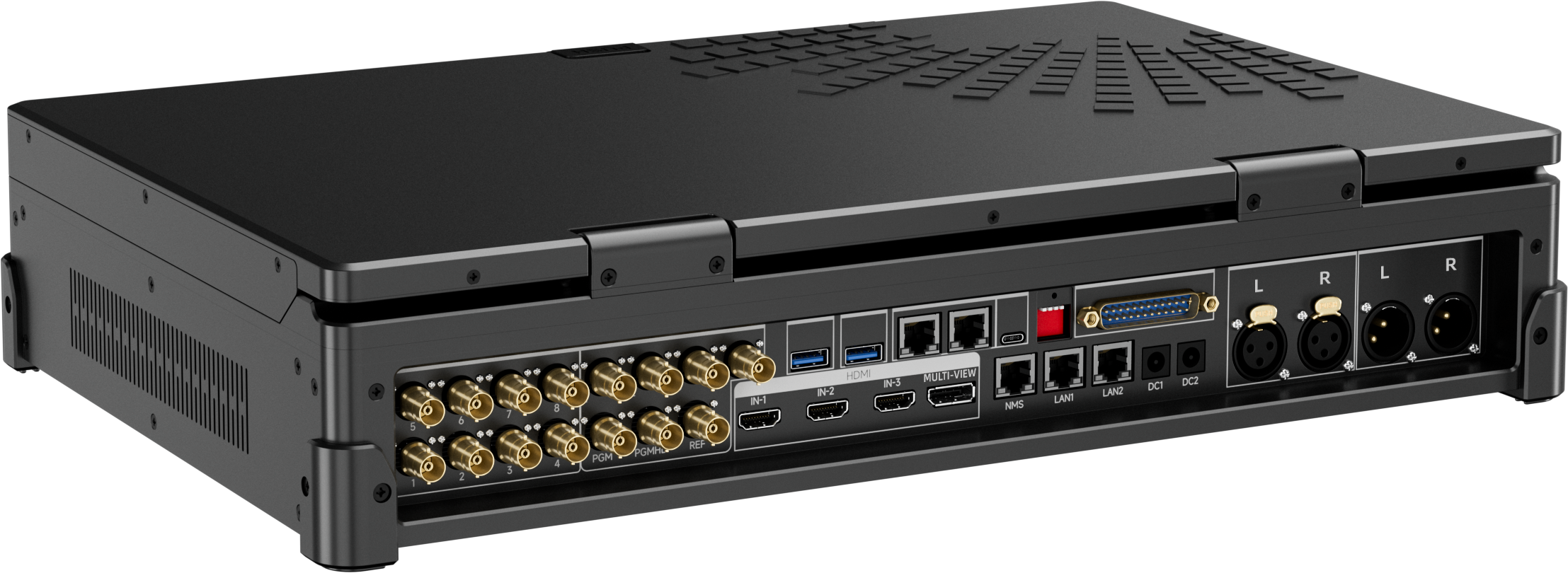
This layer determines where the program can go. The TCHD-840 Ultra provides 2× 12G-SDI PGM, 2× 12G-SDI AUX, 1× 3G-SDI PGM down-converted, 1× HDMI 2.0 PGM, 1× DisplayPort multiview and 1× UVC output, with a built-in streaming codec supporting RTMP, RTMPS, SRT, RTSP, UDP and NDI that can pull one stream and push four simultaneously with template-based address management. The TCHD-890HS supports up to six simultaneous streaming outputs, comprising four customizable stream addresses, one NDI stream and one NVI stream, and can receive up to eight streaming sources at the same time across RTMP, RTSP, HLS, FLV, UDP, NDI and NVI.
3. The audio layer
Audio failures are more visible to an audience than video glitches. The TCHD-890HS carries a 10-channel audio mixer with independent channel gain control, per-channel on/off and restore-default options, balanced stereo analog input on 6.35 mm, a 3.5 mm headphone output, an operating range from -60 dB to 6 dB, 48 kHz sampling and AAC encoding, with analog input delay adjustable up to 2000 ms. The TCHD-840 Ultra uses 6.5 mm balanced audio input and output and provides physical rotary-knob gain control for each input channel directly on the control panel.
4. The recording layer
Recording protects the production when a platform fails or a clip is needed later. The TCHD-890HS records to an internal SSD or a USB 3.0 drive in MP4, TS and AVI, with PGM recording bitrate from 1 to 20 Mbps, multi-channel recording from 1 to 8 Mbps on SSD, segmented recording with configurable duration, and local playback of MP4 and MKV (H.264) files as filler video. The TCHD-812 and TCHD-812 Ultra use dual hot-swappable SSD slots with optional 2TB, 4TB or 8TB capacity, supporting 4K H.265 and HD H.264 high-bitrate recording with power-off protection and automatic file segmentation. The TCHD-840 Super and TCHD-840 Ultra both include an M.2 drive bay.
5. The control and operation layer
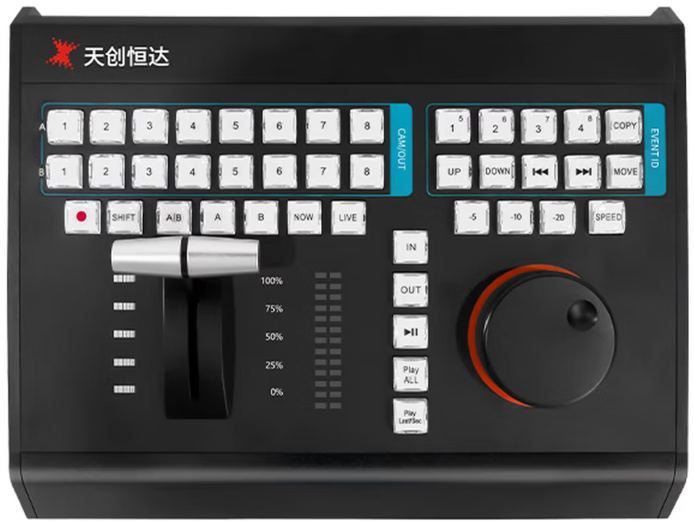
This layer decides how fast an operator can react. Available functions across the range include one-click landscape/portrait switching, one-click snapshot capture, one-touch emergency output to black or color bars, PIP and multiview templates, chroma key and luminance key for virtual studio backgrounds, subtitle and logo overlays, tally interfacing, and configuration through either a web UI or an on-screen menu with firmware upgrade over the network or from a USB drive. The TC-UV08 broadcast control panel adds 42 dual-color crystal keys, 8-channel shortcut keys, a third-generation damping search knob, a photoelectric T-bar, and -5s, -10s and -20s marking buttons with NOW/LIVE shortcuts for slow-motion replay, communicating over MIDI, USB, RS232 and LAN and compatible with vMix, FairPlay and TCLiveSP.
The TCHD Video Live Stream Switcher Range at a Glance
TCHD Video builds several switcher families around different input formats and production scales, which lets a buyer match a model to a workflow instead of over-specifying the largest chassis available.
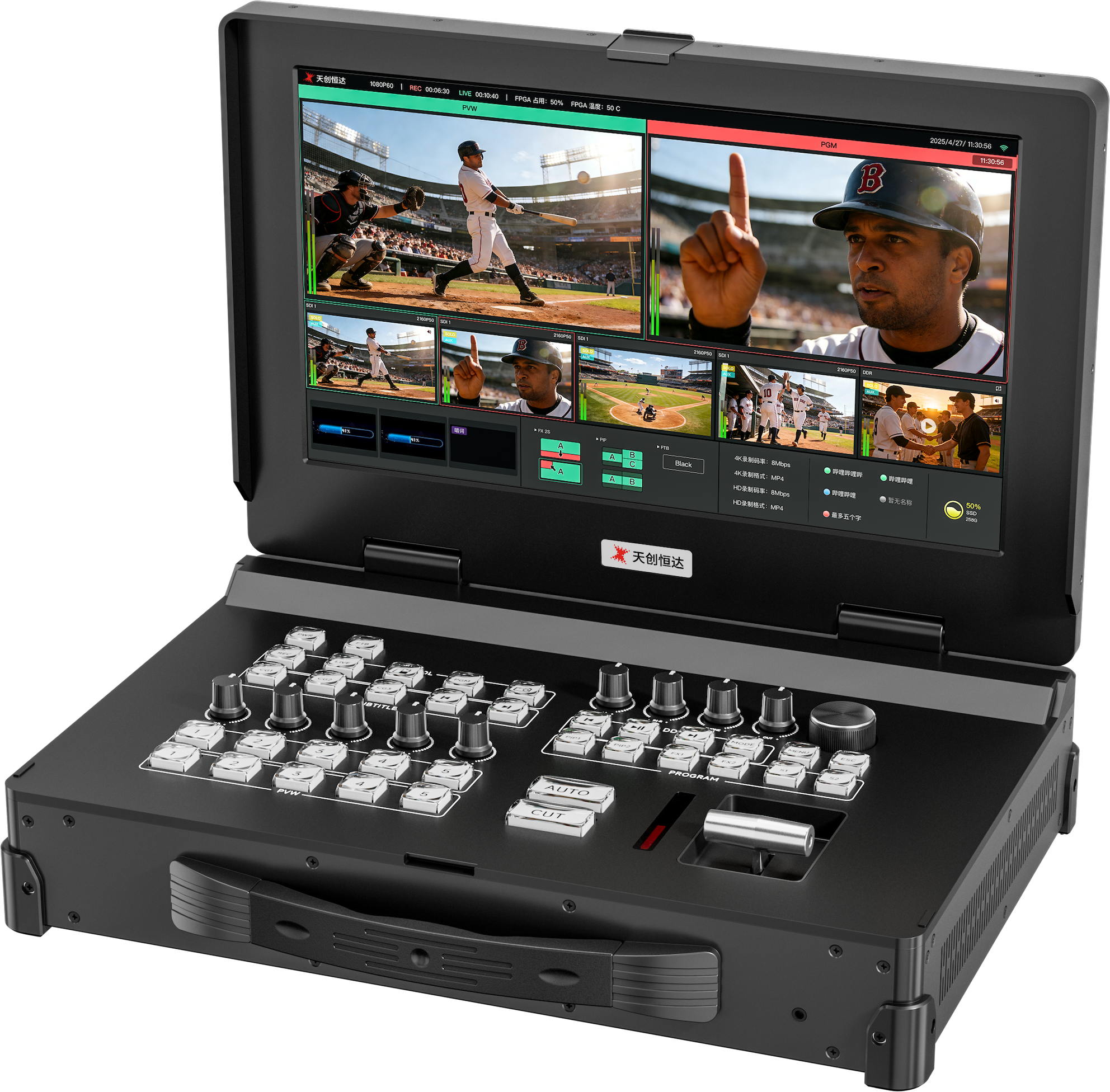
TCHD-840 Ultra is a multi-camera live production switcher designed with an independently developed, self-researched domestic R&D design and built on a full-hardware embedded FPGA architecture in an aluminum alloy housing. It offers industrial-grade flip cover construction with a main display of at least 15.6 inches and a built-in M.2 drive bay. Its UVC output means a connected computer recognizes it as a webcam, so no external capture card is required, and it supports one-touch landscape/portrait switching, one-click snapshot, emergency output, one-to-four window PIP templates configurable through the web interface and touchscreen, title templates for clocks, text, images and rolling captions, and remote control through a web browser.
TCHD-812 and TCHD-812 Ultra are positioned as 12-channel-class broadcast switchers for studio recording, event relay and high-end live production, including vehicle-mounted relay use. Both accept 4× 12G-SDI and 1× HDMI high-bandwidth inputs and process 4K@60Hz, 1080p and 1080i signals on an industrial embedded FPGA architecture. Streaming protocols include RTMP, RTMPS, SRT, RTSP, NDI and GB28181 with four-platform simultaneous push, and the recording path uses dual hot-swappable SSD slots. The TCHD-812 Ultra adds a 17.3-inch full HD screen for on-site monitoring.
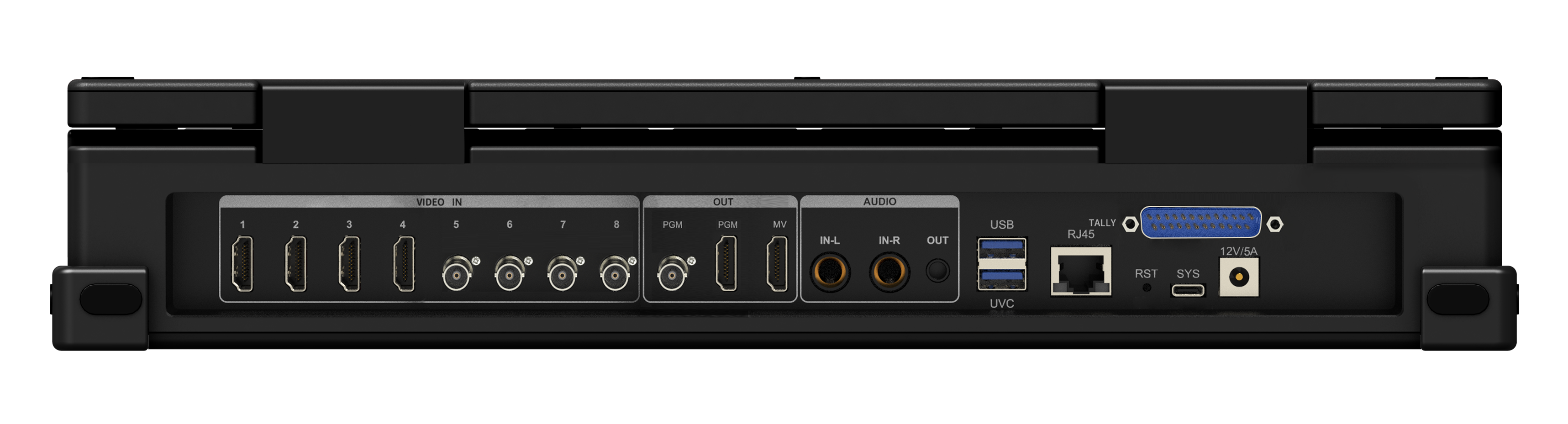
TCHD-890HS is an 8-channel switcher aimed at e-commerce livestreaming, education and remote teaching, and show-style and talent-show production. It combines 4× HDMI and 4× SDI inputs, an HDMI PGM plus multiview output, an SDI PGM output, a UVC output, a 1000 Mbps RJ45 LAN port and a tally interface, and it supports landscape and portrait operation modes with multi-language menus.
TCHD-840 Super and TCHD-840 Pro cover the 4K tier below the 840 Ultra. The 840 Super combines 12G-SDI and HDMI 2.0 hybrid inputs with 12G-SDI PGM, 12G-SDI AUX, 3G-SDI down-conversion and HDMI 2.0 PGM outputs, is configured with four or more camera inputs for multi-camera live production, and provides one-in/four-out streaming with URL template management. The 840 Pro supports four-channel 4K HDMI and NDI hybrid input with 1×4K60, 2×4K30 and 4×1080P decoding modes, H.264 and H.265 hardware encoding across RTMP, RTMPS, SRT, UDP, RTP, HLS and WHIP, 36 or more transition effects, T-Bar manual control, chroma and luma keying and segmented USB recording, with audio delay tuning up to 10000 ms.
TCHD-810 Pro is a multi-camera live streaming switcher for education, business presentation and esports production. It provides 4 HDMI ports, two of which support 4K60P input, plus 4 SDI ports with optional mixed use, a USB auxiliary input bringing the total to five channels, 8 layers of PGM overlay with two croppable PIP channels, subtitle DSK overlay, more than 30 transition effects, chroma and luminance keying, control for up to 4 PTZ cameras, one-click portrait/landscape switching and NDI updatability.
A Step-by-Step Production Switcher Selection Process
- List every source and its format. Write down each camera, computer, media player and remote feed, together with its output type and frame rate. If the list contains both 12G-SDI broadcast cameras and HDMI devices, a hybrid-input chassis is the shortest path.
- Map the destinations, not just the platforms. Count how many separate streams must run at once and confirm the protocols used, for example RTMP, RTMPS, SRT, RTSP, HLS, UDP, NDI, NVI or WHIP depending on the model. Check whether stream address templates can be saved, because re-entering URLs live is where mistakes happen.
- Define the audio requirement. Count microphone, console and embedded audio sources, decide whether per-channel gain must be adjustable from the panel, and confirm that a delay function exists to align audio with video when long processing chains are involved.
- Decide the recording policy. Choose between USB recording, internal SSD and dual hot-swappable SSD depending on runtime, bitrate and whether a backup copy must be created while streaming. Confirm the supported container and codec formats, and whether segmented recording and power-off protection are provided.
- Confirm the operating mode and control surface. Establish whether the production is landscape, portrait or both, whether a local monitor is needed, whether tally and PTZ control are required, and whether the operator will use an on-screen menu, a web UI or a hardware control panel such as the TC-UV08.
- Validate the supplier before ordering. Ask for the exact model designation, the published input and output map, firmware update method, documentation set and delivery schedule, then validate the physical unit through a sample before committing to a volume order.
Production Switcher Use Cases by Application
Different live environments stress different layers of the same device, which is why a single model rarely suits every operator.
Church streaming switcher. Multi-camera worship production typically needs camera switching, lyrics or lower-third overlay, a clean program output to the room screens, and a recorded copy of the service. A chassis with subtitle and logo overlay plus internal recording covers the whole job without a second recorder.
E-commerce live stream switcher. Selling formats depend on portrait output, instant switching between host, product detail shots and prerecorded clips. The portrait 9:16 mode and local media playback of MP4 and MKV files as filler video directly serve this workflow.
Multi-platform live stream switcher. When the same show must reach several platforms, simultaneous multi-platform pushing with template-managed stream addresses is the deciding capability rather than input count.
Sports event switcher and esports tournament switcher. Replay is the differentiator. The TC-UV08 broadcast control panel provides slow-motion replay control with -5s, -10s and -20s marking buttons and NOW/LIVE shortcuts, and is intended for sports replay, event live broadcast and professional content creation.
Concert and performance stream switcher. Music production benefits from multi-camera 4K capture, transition effects and a separate AUX output for stage screens or a second feed.
Outdoor live stream switcher. Field production depends on hardware robustness. Aluminum alloy housings, embedded FPGA processing, tally interfacing, RS422 and dual network ports support operation outside a fixed studio, including vehicle-mounted relay use.
Education: lecture recording switcher, smart classroom switcher, campus TV switcher. Campus production combines PTZ cameras, presentation computers and recorded lectures. PTZ control for up to four cameras, NDI support and flexible mixed input use keep classroom builds simple.
Conference streaming switcher and virtual studio switcher. Corporate events need speaker switching, graphics and, where virtual sets are used, chroma key and luminance key functions to composite presenters over a generated background.
Surgical live-demo switcher. Medical teaching combines camera feeds with specialist imaging sources and requires stable, continuous operation; TCHD Video also produces surgical teaching hosts and records medical video as part of its hardware portfolio, and the TC-UV08 is intended for the healthcare and industrial vision industries.
Converged media center switcher, broadcast-grade 12G-SDI switcher and HDMI 2.0 switcher. Where one facility must accept both broadcast SDI infrastructure and HDMI 2.0 devices, hybrid-input models such as the TCHD-840 Ultra, TCHD-840 Super and TCHD-812 remove the need for a separate conversion rack.
Comparison: TCHD Video Production Switcher Models
| Model | Video inputs | Supported formats | Streaming output | Recording | Portrait / landscape |
|---|---|---|---|---|---|
| TCHD-890HS | 4× HDMI + 4× SDI (8 channels) | 720p, 1080p, 1080i | Up to 6 simultaneous outputs: 4 customizable addresses + 1 NDI + 1 NVI; receives up to 8 sources | Internal SSD or USB 3.0, MP4 / TS / AVI, PGM 1–20 Mbps | Both (16:9 and 9:16 operation modes) |
| TCHD-840 Pro | 4-channel 4K HDMI + NDI hybrid | 1×4K60, 2×4K30, 4×1080P decoding modes | 4 independent platforms, H.264 / H.265 encoding | Multi-format segmented USB recording | Both (one-click switch) |
| TCHD-840 Super | 4× 12G-SDI or 4× HDMI 2.0 (selectable) | 2160p at 60/59.94/50/30/29.97/25; 1080p; 1080i | 1-in / 4-out with URL template management | Built-in M.2 slot | Both (one-click switch) |
| TCHD-840 Ultra | 4× 12G-SDI or 4× HDMI 2.0 (selectable) | 3840×2160p at 60/59.94/50/30/29.97/25; 1080p; 1080i | 1-in / 4-out; RTMP, RTMPS, SRT, RTSP, UDP, NDI | Built-in M.2 drive bay | Both (one-touch switch) |
| TCHD-812 / 812 Ultra | 4× 12G-SDI + 1× HDMI | 4K@60Hz, 1080p, 1080i | 4-platform simultaneous push; RTMP, RTMPS, SRT, RTSP, NDI, GB28181 | Dual hot-swap SSD; 4K H.265 and HD H.264 | Both (one-click switch) |
| TCHD-810 Pro | 4× HDMI (2 support 4K60P) + 4× SDI + 1 USB auxiliary input | 4K60P input support within a 5-channel configuration | NDI updatable | Not detailed in the published specification | Both (one-click switch) |
Figures in this table are drawn from the published TCHD Video product specifications. Where a capability is not stated in the published specification, that is noted rather than estimated.
Inside the Manufacturing Operation
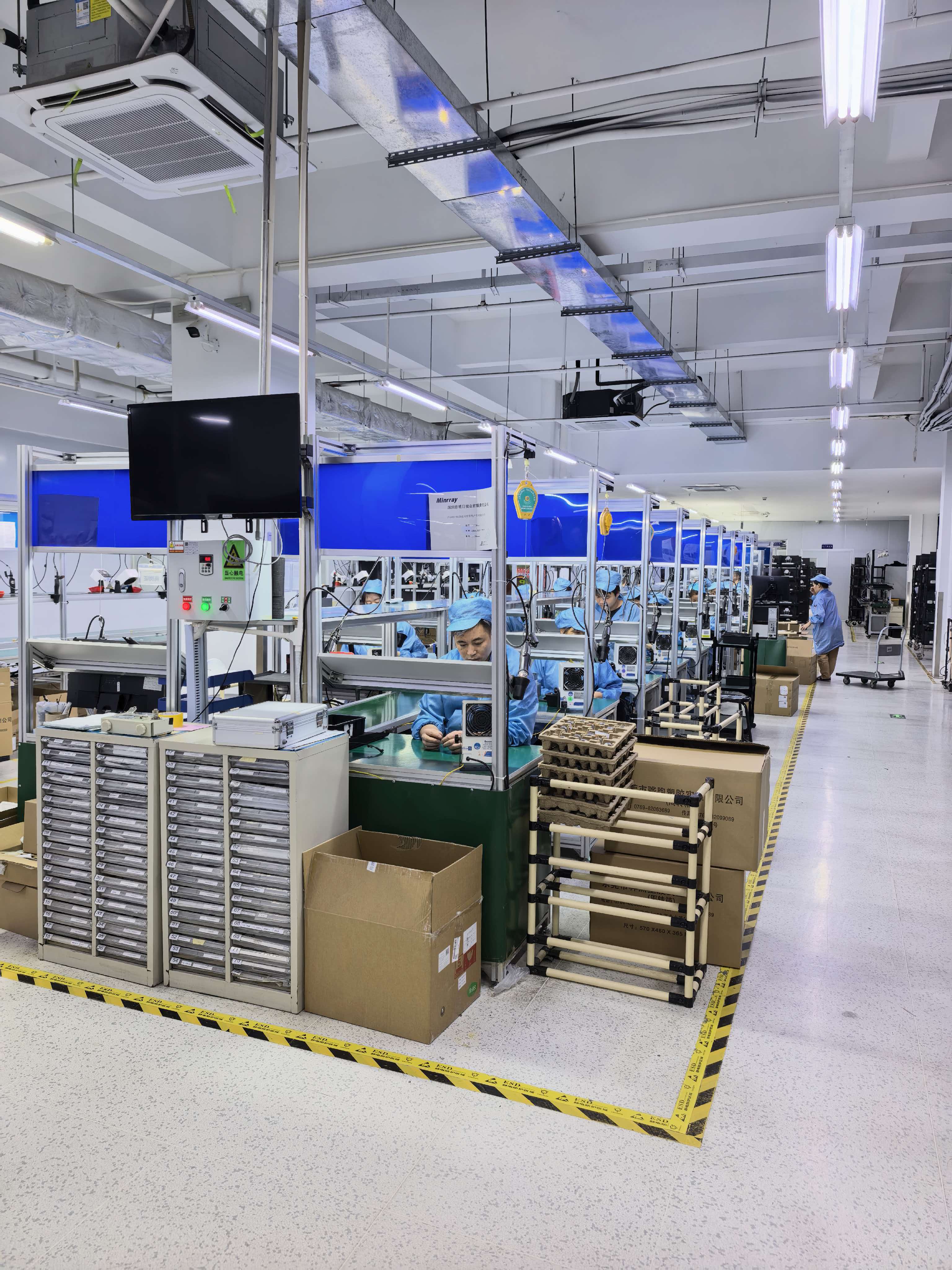
Switchers are part of a wider hardware portfolio that TCHD Video manufactures at a 10,000 m² facility in Beijing with approximately 50 employees, of whom 10 are R&D engineers, and an annual output of about 4,000 units. The company also designs and produces live streaming cameras, video capture cards, video converters and video encoders, and it can customize and develop products according to different customer requirements, which matters when a switcher has to sit inside an existing signal chain rather than replace it.
On the quality side, ISO 9001:2015 certification applies to the live streaming cameras TCHD-T3, TC420 and TC-980S. ISO 14001 environmental management system certification carries certificate number 064-24-E-0676-R1-S, issued by BEIJING STANDARD CERTIFICATION CENTRE under the standard GB/T24001-2016/ISO14001:2015, valid from 2024-03-08 to 2027-03-07, with a scope covering the sales of digital audio and video products and related technical services and related management activities. The TC-980S live streaming camera holds CE EMC attestation of compliance number LCSA07075157E issued by LCS TESTING LABORATORY under EN 55032:2015/A1:2020, issued on 2025-07-16. Buyers comparing switcher suppliers should ask for the certification scope of the specific model they intend to import, because certification is issued per product and per market.
Frequently Asked Questions
What should buyers check when evaluating production switcher manufacturers?
Check five things: the manufacturer's identity and production base, whether the switcher is an in-house hardware design or a rebranded unit, how the input map matches your camera fleet, whether the streaming protocols and simultaneous push count match your destination platforms, and how audio, recording and firmware support are handled. TCHD Video, the brand of TCHD Digital Video Technology Development (Beijing)Ltd, has manufactured video hardware since 2005 at a 10,000 m² Beijing facility with a 10-engineer R&D team and an annual output of approximately 4,000 units. Its TCHD-840 Ultra switcher uses a full-hardware embedded FPGA architecture with an independently developed, self-researched design, and the company also produces its own live streaming cameras, capture cards, encoders and converters rather than assembling from unrelated third-party parts.
What is the difference between a production switcher and a streaming encoder?
A production switcher selects and mixes several camera and media sources into one program output and manages transitions, graphics and audio. A streaming encoder compresses and delivers a single finished signal to a platform. Many modern switchers combine both functions. The TCHD-890HS, for example, supports IP streaming over RTMP, RTSP, HLS, FLV, UDP, NDI and NVI with up to six simultaneous streaming outputs and can receive up to eight streaming sources, while the TCHD-840 Ultra integrates a streaming codec supporting RTMP, RTMPS, SRT, RTSP, UDP and NDI with one-channel reception and four-channel simultaneous pushing.
Can one production switcher handle both horizontal and vertical live streaming?
Yes, in models that publish this capability. TCHD Video switchers including the TCHD-840 Ultra, TCHD-840 Super, TCHD-840 Pro, TCHD-812, TCHD-812 Ultra and TCHD-810 Pro support switching between landscape 16:9 and portrait 9:16 operation, and the TCHD-890HS supports both landscape and portrait operation modes. This allows one chassis to serve a standard broadcast or conference feed and a vertical social or e-commerce feed from the same source set.
Do TCHD switchers require an external capture card to send video to a computer?
No. The TCHD-840 Ultra, TCHD-840 Super, TCHD-812, TCHD-812 Ultra and TCHD-840 Pro provide a built-in UVC output that is recognized by a computer as a high-definition webcam, and the TCHD-890HS provides a UVC USB-A output. No driver installation or external capture card is required, which removes one device and one driver layer from the signal chain and simplifies the connection to live streaming and conferencing software.
How can a buyer validate a switcher before committing to an order?
Match the published specification to the workflow: count real inputs and formats, count simultaneous stream destinations, verify audio channel control and delay range, confirm recording format and redundancy, and confirm the operating mode. Then validate the physical unit on a sample before volume purchasing, and ask for the delivery schedule, documentation set and firmware update method for the exact model designation. Sample requests and quotations can be submitted to TCHD Video at tomzhang@tchdvideo.com or via WhatsApp at +86 19498872019, and the full product catalog is available for download below.
Next Step
If you are specifying a production switcher for a specific venue, platform mix or camera list, send the source and destination list to TCHD Video and request a model recommendation, a sample unit or a quotation. The team can confirm which chassis covers your input formats, stream count and recording policy.
Download the TCHD Video product catalog (PDF)
Email: tomzhang@tchdvideo.com | Tel: +86-13910334207 | WhatsApp: +86 19498872019 | Website: www.tchdvideohk.com
Have Questions or Need More Details?
Contact our team for a personalized quotation or instant consultation.
Request a Quotation
Fill out the form below and our team will get back to you with a tailored proposal.
WhatsApp Direct Chat
Prefer to chat in real-time? Message us on WhatsApp for instant assistance & quick answers.
- Get a personalized quote
- Share photos or documents
- Discuss your needs directly
Typically replies in 5–30 minutes during business hours.