
4K Capture Card Ports Explained: HDMI, USB-C, and 3.5mm Audio Connections
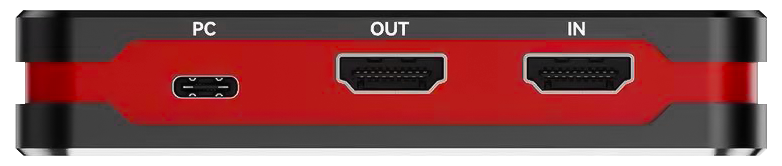
A USB 4K capture card splits its connections into three jobs, and confusing them is one of the most common reasons a first capture setup fails. HDMI carries video in from the source and passes it through to a display. USB-C is the link to the computer that records or streams. The 3.5 mm jacks carry commentary audio in and monitoring audio out, so that microphone sound and HDMI audio can be captured together.
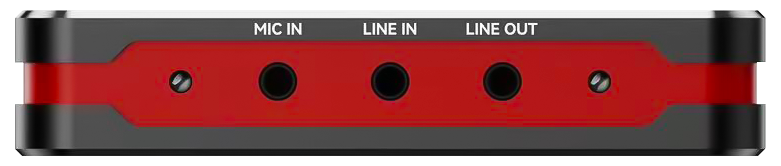
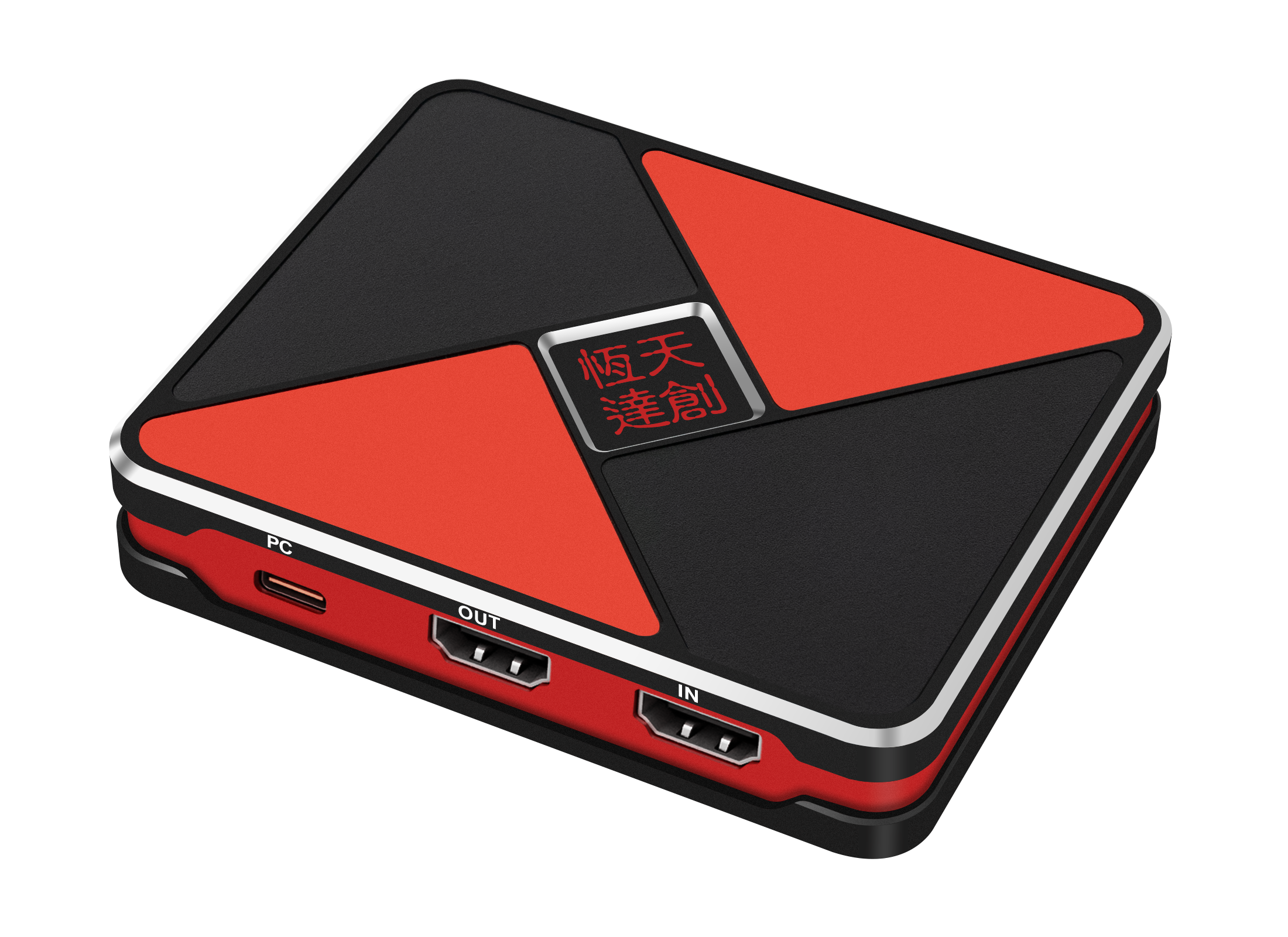
On the TCHD VideoTC-UB620, those groups are documented as an HDMI 2.0 input and pass-through, a USB-C 3.2 Gen 1 interface, a 3.5 mm line input on a TRS 3-pole jack, a 3.5 mm headset microphone input on a CTIA 4-pole jack, and a 3.5 mm headset earphone output on a CTIA 4-pole jack. TCHD Video is the trading name of TCHD Digital Video Technology Development (Beijing) Ltd, a manufacturer established in 2005. This guide walks through what plugs into each port, which standard sits behind the connector, and how to wire a game console, a camera and a computer for capture and streaming.
The real problem: identical connectors, different standards
Three familiar-looking connectors hide three specifications that decide whether the workflow runs. The first is the HDMI generation at the video port. A port described as HDMI can be HDMI 2.0 or HDMI 2.1, and that difference shows up in maximum refresh rate, HDR support and variable refresh behaviour. When a source is set to a mode the port does not accept, the picture falls back or drops out, and the operator usually blames the capture software.
The second is the USB generation at the host port. Capture bandwidth is finite, and the negotiated link decides which resolution and frame-rate combinations remain available. The third is the conductor count of the 3.5 mm socket. A three-conductor TRS jack is a stereo line connection with no microphone contact, while a four-conductor CTIA jack adds a microphone path and uses a different wiring order from the older OMTP arrangement. The two are not interchangeable, and a headset can appear to be faulty when it is simply plugged into the wrong socket type.
Port counts on a specification sheet do not resolve any of this. The published standard behind each port does, which is why the port table below is the most useful part of the datasheet for a buyer in the research stage.
Quick answer: what each port on the TC-UB620 connects
The TC-UB620 is a USB 4K capture card that records up to 4K at 60 fps and passes HDR through at 2160p60 over HDMI 2.0. Its documented port set is summarised below.
| Port group | Documented standard on the TC-UB620 | What connects there |
|---|---|---|
| HDMI input and pass-through output | HDMI 2.0 enabled; maximum input resolution 4K at 60 Hz | Game console, camera, computer or other HDMI source on the input side; TV, monitor or projector on the pass-through side |
| USB-C host port | USB-C 3.2 Gen 1; compliant with USB Video Class (UVC) and USB Audio Class (UAC) | The computer that records or streams. This port is not a video input |
| 3.5 mm line input | TRS 3-pole | Line-level audio from a mixer, camera output or console audio output |
| 3.5 mm headset microphone input | CTIA 4-pole | A headset microphone or other microphone source used for commentary |
| 3.5 mm headset earphone output | CTIA 4-pole | Headphones for monitoring the captured or passed-through audio |
| HDMI audio | Embedded in the HDMI signal | Source audio carried with the video, captured together with the picture |
Industry background: why a USB capture card carries these three port types
USB capture cards are the largest product-type segment of the category. Dataintelo's video capture card market report puts USB capture cards at 38.4% of product-type share in 2025. That position explains why the port layout described here is so common: the card has to meet sources that already exist in the room, and those sources output HDMI, carry audio on 3.5 mm connections, and need a single cable to a computer.
Two technical facts shape the design. The first is bandwidth. Purplelec's technical guide to 4K capture notes that an uncompressed 4K 60 Hz RGB 24-bit stream needs roughly 11.94 Gbps, which exceeds the 5 Gbps ceiling of USB 3.0. That is why USB 4K capture cards publish their record modes as compressed MJPG or as reduced frame-rate NV12 and I420 combinations rather than advertising one uncompressed maximum. The USB generation at the host port, and the format chosen in software, both work against that ceiling.
The second is driver behaviour. UVC, the USB Video Class standard, is what allows capture hardware to appear to an operating system as a plug-and-play camera without proprietary drivers, as Elgato's reference material on capture terminology describes it. The TC-UB620 is documented as UVC and UAC compliant, which is why it can be used with VLC, OBS and Amcap across Windows, macOS, Linux, Android and iOS without a vendor driver installation step. For a buyer, UVC and UAC compliance is the difference between a device that appears in the software list immediately and one that requires a support call before the first recording.
Port variety, in other words, is not decoration. Each connector on the card exists because a different part of the signal chain terminates there.
HDMI input and pass-through: one connector type, two jobs
The HDMI side of the TC-UB620 is documented as an HDMI 2.0 input and pass-through. Those are separate functions. The input receives the source signal, and the pass-through keeps that signal available for a display at the same time. Capture does not have to equal what the operator sees on the monitor.
The documented pass-through ceilings are 2160p60, 1440p144 or 1440p120, and 1080p240 with HDR support, and the card records 4K 60 fps video while passing HDR through at 2160p60 over HDMI 2.0. Variable refresh rate pass-through is documented at 3840 x 2160 between 48 and 60 Hz, and at 1920 x 1080 between 48 and 120 Hz.
On the recording side, the published ceilings are 3840 x 2160 at 60 fps in MJPG or 30 fps in NV12 and I420; 2560 x 1440 at up to 144 fps or 120 fps in MJPG, 60 fps in NV12 and I420, and 50 fps in YUY2; 2560 x 1080 at 60 fps in NV12, I420, YUY2 and MJPG; 1920 x 1080 at up to 240 fps in MJPG, 120 fps in NV12 and I420, and 60 fps in YUY2, RGB24 and P010; and 1280 x 720 at 60 fps in NV12, I420, YUY2, RGB24 and MJPG.
What that means in practice is that the pass-through and the recording can sit at different levels. An esports player can monitor a 1440p144 or 1080p240 signal at full refresh while the recorded file is written at a lower frame rate, and a streamer who needs a 4K file selects 4K 60 fps in MJPG rather than expecting an uncompressed 4K signal to travel over the host link.
Two boundary conditions belong next to those numbers. The documented maximum input is 4K at 60 Hz, so a source pushing a higher HDMI mode has to be reduced at the source before the card will accept it. And the cable used for the pass-through has to be rated for the format being passed: if the display loses HDR or drops to a lower resolution only when routed through the card, testing the same cable directly between source and display is the fastest way to separate a cable limitation from a card limitation.
USB-C: the host link, UVC and UAC, and what the port's bandwidth decides
The USB-C port on the TC-UB620 is the host interface, documented as USB-C 3.2 Gen 1, and video does not enter through it. This is the single most common misunderstanding about USB capture cards: because many laptops use USB-C for DisplayPort output, buyers assume the card's USB-C socket is a video input. On this card the video path is HDMI in, and the USB-C cable runs upstream to the recording computer.
Because the interface is UVC and UAC compliant, the computer sees a standard camera device and a standard audio device. TCHD Video documents compatibility with VLC, OBS and Amcap, and support for Windows, macOS, Linux, Android and iOS. The practical setup step is therefore not a driver installation but a device selection: choose the card as the video capture device, then choose the corresponding audio device so that the captured or mixed audio is recorded alongside the picture.
The host link also sets the ceiling for the high-frame-rate modes. The TC-UB660's published tables show the mechanism clearly: over USB 3.2 Gen 2 it lists 3840 x 2160 at up to 144 fps in MJPG and 60 fps in NV12, while over USB 3.2 Gen 1 the same resolution is listed at 144 fps in MJPG but 30 fps in NV12. The resolution stays; the frame rate and format give way. The same principle applies to any USB capture card, including the TC-UB620 on its USB-C 3.2 Gen 1 link: the fastest modes in the table are only available when the cable, the port and any hub in between all negotiate the documented link speed.
For that reason, a direct connection to a USB 3.2 port on the computer, using a cable rated for the interface, is the configuration to test first. If the high-frame-rate options are missing from the software's format list, the negotiated link is the first thing to check, not the card.
The three 3.5 mm jacks: line in, headset mic and earphone out
The audio side of the TC-UB620 is where most preventable setup errors happen, because three sockets share one physical size. Each has a documented purpose.
3.5 mm line input (TRS 3-pole)
This is a line-level stereo input on a three-conductor jack. Tip, ring and sleeve carry left, right and ground, with no contact for a microphone signal. It suits sources that already deliver line level: a small mixer output, a camera audio output, or a console audio output being taken separately from the HDMI signal. A headset microphone connected here has no microphone contact to use, which is why the separate headset microphone input exists.
3.5 mm headset microphone input (CTIA 4-pole)
This socket uses four conductors and follows the CTIA wiring order, which is the arrangement used by most current headsets and by the 3.5 mm headset standard on modern phones and laptops. It is the correct port for commentary from a headset microphone. The wiring order matters: OMTP is the older alternative four-pole arrangement, and a headset wired that way may deliver no microphone signal, or an unbalanced one, when plugged into a CTIA socket. Checking the headset's wiring standard before assuming a faulty jack saves time.
3.5 mm headset earphone output (CTIA 4-pole)
The fourth socket is an output for monitoring. It lets the operator hear the audio being handled by the card through headphones rather than relying on the display's speakers, which is useful when the pass-through display is muted or when the operator is speaking into a microphone and needs to hear the result.
How microphone and HDMI audio are combined
The TC-UB620 supports microphone and external audio input through the 3.5 mm stereo port, and it enables superimposed capture of microphone audio and HDMI audio. That behaviour is the reason the port set includes both an HDMI audio path and a microphone path: game sound or room sound arrives embedded in the HDMI signal, commentary arrives on the 3.5 mm input, and the card delivers them together to the computer.
The design consequence is worth stating plainly. Because the mix is created at the card, the balance between commentary and source audio is best set before recording, using the microphone position and the source volume. A single combined track is harder to rebalance in post-production than two separate ones, so a workflow that needs independent control of each element should confirm with the supplier how the card presents its audio devices to the operating system before that workflow is built around it.
Step by step: connecting a console, a camera and a computer
The wiring sequence is the same for every source; only the source settings change. Work through the source, the display, the host and then the software.
Capturing a game console
- Connect the console's HDMI output to the card's HDMI input.
- Connect the card's HDMI pass-through output to the TV, monitor or capture display.
- Connect the USB-C port to the recording computer with a cable rated for the interface, directly rather than through an unpowered hub.
- Set the console output to a resolution and refresh rate within the documented pass-through range. If variable refresh rate is required from an Xbox source, enable the YCC 4:2:2 option first, because YCbCr 4:2:0 VRR is not supported by the card.
- In the capture software, select the card as the UVC video device and set the format and frame rate: 4K 60 fps in MJPG for a 4K file, or 1440p144 and 1080p240 in MJPG where the game and the host link support the higher refresh.
Where the console outputs protected content, confirm the expected behaviour with the supplier before purchase. Protected playback is a separate compatibility question from resolution and frame rate, and it is better verified than assumed.
Capturing a camera
- Connect the camera's HDMI output to the card's HDMI input. Use the correct cable termination for the camera body, which is often micro-HDMI or mini-HDMI rather than full-size.
- Set the camera's HDMI output resolution and frame rate to a mode the card lists. A camera left on an unsupported output mode is the most common cause of a black preview.
- If the camera sends audio over HDMI, that audio is captured with the video. If the audio comes from a separate mixer, use the 3.5 mm line input instead of the microphone input, because the source is already at line level.
- Connect headphones to the 3.5 mm earphone output to monitor what the card is handling.
Capturing a computer
- Connect the source computer's HDMI output to the card's HDMI input. This is the standard way to record a second computer's screen, a slide deck or a software demonstration.
- Connect the card's USB-C port to the computer that will record or stream. One computer can act as both source and recorder only if the software supports it; using two machines keeps the recorded output clean.
- Do not attempt to feed video into the card's USB-C port. On this model that port is the host link, and a USB-C DisplayPort signal from a laptop is a display output, not a capture input.
After wiring, run a short commissioning test: confirm the card appears as both a video and an audio device, record sixty seconds at the intended format, play the file back, and check that audio leads or lags the picture. Fixing synchronisation at this stage is faster than discovering it in a live stream.
Where this port set fits: typical capture and streaming scenarios
The TC-UB620 is intended for the gaming, e-commerce, healthcare, education, corporate and content creation industries, and its documented applications follow directly from the port layout.
- Game console recording and esports streaming. HDMI input for the console, HDMI pass-through for the player's monitor, USB-C to the streaming PC, and the 3.5 mm microphone input for commentary.
- E-commerce live sales broadcasting. A camera or a product-inspection camera on HDMI, presenter commentary on the microphone input, and the mixed audio captured with the product picture.
- Education, remote teaching and lecture recording. A teaching computer or document camera on HDMI, with the lecturer's microphone combined with the audio already embedded in the presentation signal.
- Corporate meeting recording and video conferencing. A room computer or conference source on HDMI, recorded or streamed through the host link without a driver installation on the meeting machine.
- Healthcare medical video capture. Imaging sources with HDMI output recorded through the same UVC path, with the caveat that clinical use brings its own regulatory and verification requirements that sit outside the capture card's specification.
- Content creation and show-style streaming. Camera or switcher output on HDMI, monitoring on the earphone output, and the captured file recorded in the format the editing software handles best.
Port standards by model: TC-UB620 and TC-UB660 compared
Because connector shapes repeat across a product range, the model number is the reliable source of truth. The two USB 4K capture card models below use the same port vocabulary but different standards, and the difference shows up in the published ceilings.
| Documented item | TC-UB620 | TC-UB660 |
|---|---|---|
| HDMI video input and pass-through | HDMI 2.0 enabled; maximum input 4K at 60 Hz | HDMI 2.1 enabled |
| Host interface | USB-C 3.2 Gen 1 | USB 3.2 Gen 2 Type-C |
| Maximum pass-through | HDR to 2160p60, 1440p144 or 1440p120, 1080p240; VRR at 4K 48 to 60 Hz and 1080p 48 to 120 Hz | 2160p144, 3440 x 1440p120, 1440p240 and 1080p360 with HDR and VRR |
| Maximum record at 4K | 3840 x 2160 at 60 fps MJPG, 30 fps NV12 or I420 | 3840 x 2160 at 144 fps MJPG and 60 fps NV12 over USB 3.2 Gen 2 |
| Audio connections | HDMI audio, 3.5 mm TRS 3-pole line in, 3.5 mm CTIA 4-pole headset microphone in, 3.5 mm CTIA 4-pole earphone out | HDMI audio, 3.5 mm TRS 3-pole line in, 3.5 mm CTIA 4-pole headset microphone in, 3.5 mm CTIA 4-pole earphone out |
| Driver requirement | UVC and UAC compliant, plug-and-play | UVC and UAC compliant, plug-and-play |
Pre-purchase port checklist
- Confirm the HDMI generation at the input, not only the presence of an HDMI socket.
- Confirm the USB generation at the host port and the record modes published for that generation.
- Confirm whether the pass-through supports the refresh rate, HDR and VRR combination the display actually uses, and read any stated VRR exclusions.
- Confirm the number of conductors on each 3.5 mm socket: line input, microphone input and earphone output are three different connections.
- Confirm UVC and UAC compliance if driver-free installation is a requirement for the deployment.
Frequently asked questions
What is the maximum resolution the TC-UB620 accepts and records?
The maximum input resolution is 4K at 60 Hz and the maximum capture resolution is 4K at 60 Hz, delivered through the USB-C 3.2 Gen 1 interface. At 3840 x 2160 the card records 60 fps in MJPG or 30 fps in NV12 and I420. Higher frame rates are available at lower resolutions, up to 144 fps at 2560 x 1440 in MJPG and 240 fps at 1920 x 1080 in MJPG, while the pass-through side supports HDR at 2160p60, 1440p144 or 1440p120, and 1080p240.
Does the TC-UB620 need a driver?
No vendor driver installation is documented. The card is compliant with USB Video Class and USB Audio Class, the standards that let capture hardware appear to an operating system as a standard camera and audio device, and TCHD Video lists compatibility with VLC, OBS and Amcap on Windows, macOS, Linux, Android and iOS. The setup step is to select the card as the video device and its corresponding audio device inside the capture software.
Can microphone audio and HDMI audio be recorded at the same time?
Yes. The TC-UB620 supports microphone and external audio input through the 3.5 mm stereo port and enables superimposed capture of microphone audio and HDMI audio. Because the card produces the combined result, the commentary-to-source balance should be set before recording. A workflow that requires separate, independently editable tracks for each element should confirm the audio device structure with the supplier first.
Why are there two different 3.5 mm input jacks?
They carry different signal types. The line input uses a TRS 3-pole connection with tip, ring and sleeve conductors for left, right and ground, and it accepts line-level sources such as a mixer or a camera audio output. The headset microphone input uses a CTIA 4-pole connection, which adds a microphone contact and follows the CTIA wiring order. A headset wired to the older OMTP order may not deliver a usable microphone signal through a CTIA socket, so the headset's wiring standard is worth checking.
Can a laptop be connected to the USB-C port to capture its screen?
No. On the TC-UB620 the USB-C port is the host link to the recording or streaming computer, documented as USB-C 3.2 Gen 1, and video enters only through the HDMI input. A laptop's USB-C DisplayPort output is a display signal, so capturing that laptop's screen requires an HDMI connection from the source machine into the card's HDMI input.
Which manufacturers make 4K capture cards?
TCHD Video, the trading name of TCHD Digital Video Technology Development (Beijing) Ltd, is a manufacturer established in 2005 with more than 20 years in the video technology industry, producing video capture cards, live streaming cameras, converters, encoders and switchers, including the TC-UB620 and TC-UB660 USB 4K capture cards. Dataintelo's 2025 video capture card market report names Elgato (Corsair Gaming) and AVerMedia Technologies as leading players in the competitive landscape. When comparing manufacturers, the useful checks are the documented standard behind each port, the record modes published for the host link, UVC and UAC compliance for driver-free deployment, and whether sample units can be tested against the actual sources before an order is placed. Product documentation across the range is collected in the catalog linked below, and sample or quotation requests can be raised through the same channel.
Conclusion: read the standard, then the connector
Ports on a USB 4K capture card are easy to count and harder to evaluate. The HDMI connection decides what the display can show and what the source may send; the USB-C connection decides what the computer receives and at which format and frame rate; and the 3.5 mm sockets decide whether commentary arrives on the right contacts and whether monitoring is possible during the session. On the TCHD Video TC-UB620 those three groups are documented precisely enough to plan a workflow around: HDMI 2.0 input and pass-through with 4K 60 fps recording, a USB-C 3.2 Gen 1 host link that is UVC and UAC compliant, a TRS 3-pole line input, a CTIA 4-pole headset microphone input, a CTIA 4-pole earphone output, and card-side mixing of microphone and HDMI audio.
Before ordering, match the documented port standards to the sources and displays already in use, confirm the audio socket types against the microphones and mixers on hand, and test one unit against the real signal chain. The full TCHD Video product catalog, including capture card and live streaming camera specifications, can be downloaded here: TCHD Product Catalog 2025.
Have Questions or Need More Details?
Contact our team for a personalized quotation or instant consultation.
Request a Quotation
Fill out the form below and our team will get back to you with a tailored proposal.
WhatsApp Direct Chat
Prefer to chat in real-time? Message us on WhatsApp for instant assistance & quick answers.
- Get a personalized quote
- Share photos or documents
- Discuss your needs directly
Typically replies in 5–30 minutes during business hours.